







MONJI+

User Support

Your go-to support page for troubleshooting and getting the most out of MONJI+

MONJI+ for Web Agencies

Stop drowning in feedback — spend your time proposing improvements.
Bring everything client work needs into one place to raise quality and keep improving.

Review, request, and share — all on the same screen as your client.

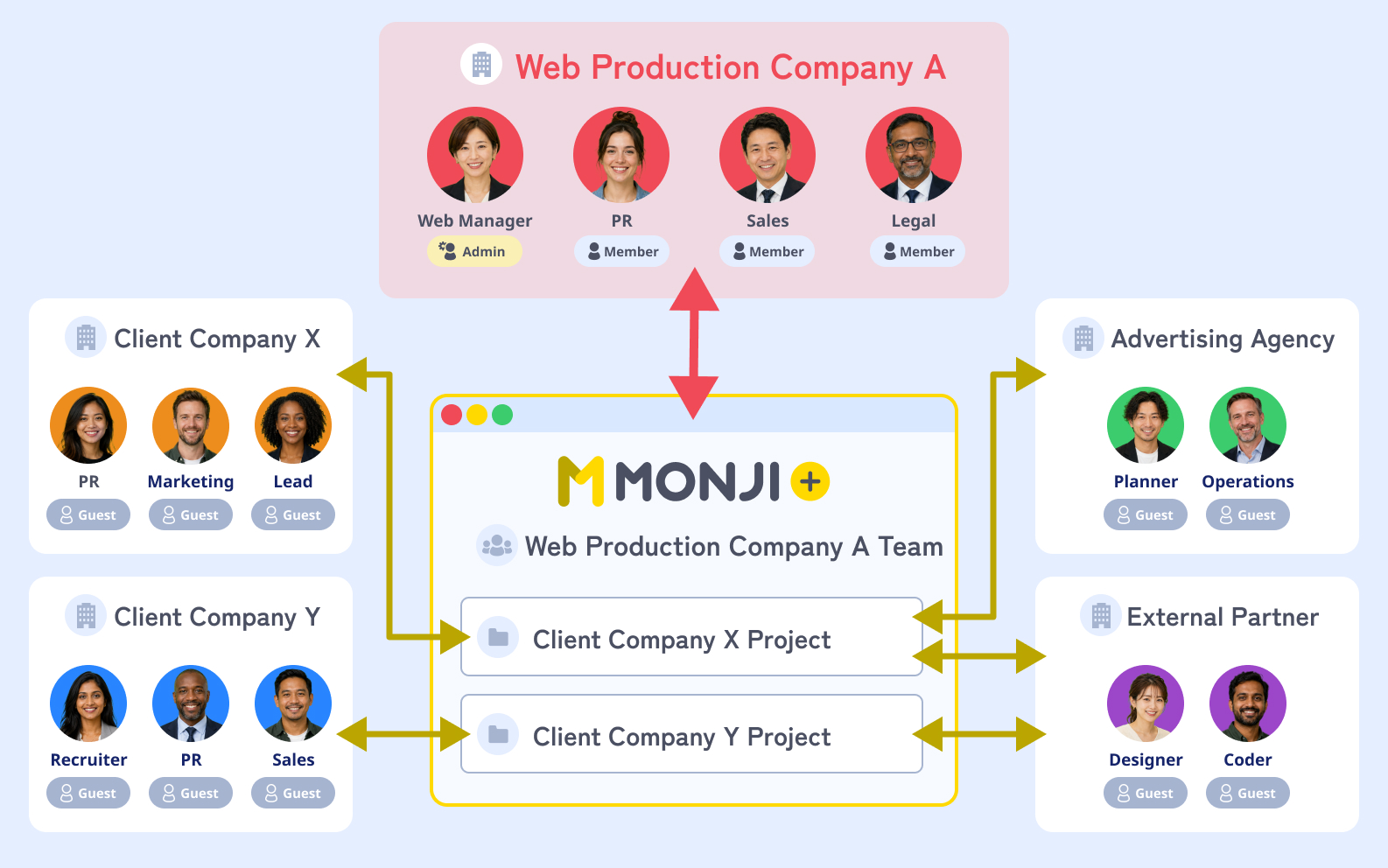
Your agency, the client, and external partners meet in one project.
Invite guests to share only what each person needs.

Diagram: agency, client, and external partners collaborating in one shared project
Pattern A
Agency teamCorporate siteProjectEC siteProjectBrand siteProject

Run multiple sites under one team

Create one team for your agency and open a project per site. A good fit when you want to oversee every project and site from one place.

Pattern B
Client A TeamClient B TeamCorporate siteProjectEC siteProjectLPProjectBrand siteProject

Split teams by client

Create one team per client and manage plans and members separately.
A good fit when you need different permissions, billing, or operations per client.

Quick guide

Pick the pattern that matches how your agency operates.

  • Oversee every project from one placePattern A
  • Separate permissions by clientPattern B
  • Manage retainer projects togetherPattern A
  • Run dedicated teams per clientPattern B


5 everyday scenes where agency work gets stuck

Asset sharing, feedback, pre-launch QA, Issue Detection, GA improvement.
See how MONJI+ keeps client work flowing.

Scene 01

Assets and references get scattered

Before

Files live across email, chat, and storage, so you keep searching and re-sending.
As a result, directors end up asking the client for assets over and over.

With MONJI+

No more hunting for where things were saved — up to 80% less search time *1

  1. 1Upload directly into the project
  2. 2Bookmark URLs in the same place
  3. 3Make one place the source of truth

Assets and references get scattered
Scene 02

Feedback gets buried in chat

Before

It's hard to see what needs changing, or who's already on it.
So a director has to scroll back through chat every time, just to re-sort the edits.

With MONJI+

End the he-said-she-said back-and-forth, with up to 5× fewer exchanges *1

  1. 1Write feedback directly on the page in the browser
  2. 2Update the status (In Progress / Done)
  3. 3Share with the client in the same view
FeaturesFeedback
Feedback gets buried in chat
Scene 03

Pre-launch QA depends on one person

Before

QA quality shifts with whoever runs it, and typos and misses slip through.
That's why pre-launch QA always ends up resting on one particular person.

With MONJI+

Final-QA anxiety turns into an AI checklist

  1. 1Turn on AI Typo Detection for Feedback and scan the page
  2. 2Convert flagged issues into feedback
  3. 3Assign each one to the right person
Pre-launch QA depends on one person
Scene 04

Post-launch issues go unnoticed

Before

Broken links, render errors, and SEO mistakes tend to surface too late.
Yet no one can keep checking the site by hand forever after delivery.

With MONJI+

Spot issues before your client does — early detection

  1. 1Register the URLs you want to monitor
  2. 2Set the crawl frequency
  3. 3Get notified the moment something breaks
Post-launch issues go unnoticed
Scene 05

Numbers alone don’t turn into proposals

Before

Analytics is hard to turn into the next improvement or feedback request.
So every month ends with nothing but a report to show.

With MONJI+

GA inline — numbers to feedback without switching tools

  1. 1Check Google Analytics inside MONJI+
  2. 2Mark up the pages where issues were detected
  3. 3Send them out as feedback right from there
Numbers alone don’t turn into proposals

*1 Internal data. Actual results vary by usage, workflow, and project type.

Workflows powered by MONJI+

Chain these scenes together to run real client projects.
Onboarding, pre-launch review, monthly maintenance — three playbooks.

Work flow 01

Onboard a new client

Pull kickoff calls, asset sharing, and early feedback into one project.

  1. 01

    Day 1

    Agency

    Create the project

    Team/project
  2. 02

    Day 2

    Agency

    Invite the client

    Guest invite
  3. 03

    Day 1-2

    Agency

    Upload assets and URLs

    File sharing
  4. 04

    Day 3-5

    Client

    Review and comment in the browser

    Feedback
  5. 05

    Day 5-7

    Agency

    Turn comments into feedback

    Feedback list
Work flow 02

Run pre-launch review

Move design review, typo check, feedback, and final QA through one flow.

  1. 01

    3 days before

    Agency

    Share the preview page

    Guest invite
  2. 02

    3-2 days before

    Client

    Mark up the page and send feedback

    Feedback
  3. 03

    2 days before

    AI + Agency

    Run AI copy check

    AI Typo Detection for Feedback
  4. 04

    1 day before

    Agency

    Apply fixes and mark done

    Feedback
  5. 05

    Launch day

    Agency

    Verify everything and approve launch

    Feedback list
Work flow 03

Run monthly maintenance

Loop Issue Detection, GA review, improvement proposals, and fixes into a monthly cadence.

  1. 01

    Every Monday

    Automated

    Receive Issue Detection alerts

    Website Issue Detection & Improvement
  2. 02

    1st of the month

    Agency

    Review GA numbers

    GA integration
  3. 03

    1st–3rd

    Agency

    Log feedback items

    Feedback
  4. 04

    5th of the month

    Agency → Client

    Share the monthly report

    File sharing
  5. 05

    Ongoing

    Agency

    Keep the knowledge in the Wiki

    Wiki
User Voice

Launch used to be the end. Now we keep improving with the client on the same screen, even after going live.

Feedback pinned on the page cut down email and chat mix-ups, so improvements move faster.

We’re now seen less as “the agency” and more as the client’s WebOps partner — and retainers keep growing.

— Director at a web agency using MONJI+

Common questions before getting started

We’ve answered the things teams usually ask up front.

Q.01

Will the client actually use it?

Invite them as a guest, and they can join the project right away.
They just open the page URL and write directly in the browser — no training needed.

Q.02

Do we have to use it on every project?

Start with one. Our 30-day free trial lets you try MONJI+ on a single project.
Run it alongside your existing workflow on other projects.

Q.03

Can it run alongside Slack and email?

Yes — they work well together.
Use MONJI+ as the home for website feedback, review, and sharing, and keep your day-to-day chat where it already is.

Q.04

Is there a plan that fits our project size?

Plans range from Free ∞ to paid. No contract lock-in — monthly billing, paid in advance. See the Pricing Plans for details.

Q.05

Is it secure?

Yes. MONJI+ includes two-factor authentication and IP-based access restrictions for feedback.
See the security feature page for details.

Q.06

Can we use it for pre-launch checks too?

If MONJI+ can reach your staging URL, comment right on the screen — great for internal review and client sign-off.
Pages behind Basic auth or a login open with no ID or password via the MONJI-izm Chrome extension.

Start with the one project where feedback piles up.

Try every feature free for 30 days.

You don’t have to roll it out everywhere at once.
Pick one project — the one with the heaviest feedback, the longest retainer, the deepest pain — and try MONJI+ on it.

Projects where MONJI+ shines

  • High-feedback projects
  • Projects with frequent client reviews
  • Projects with heavy asset sharing
  • Projects on a maintenance retainer
  • Projects with critical pre-launch checks
  • Projects with many collaborators

MONJI+ keeps evolving with how web agencies actually work

We keep refining MONJI+ to be easier to use and to drive more meaningful outcomes.

FEAT 01

Feedback trend analysisPlanned

AI analyzes your feedback history and surfaces patterns worth improving.

FEAT 02

AI-powered site improvement suggestionsPlanned

AI scans page screenshots and points out spots to improve.

FEAT 03

Sitemap viewPlanned

Manage feedback, info, and data efficiently at the page level.

* Upcoming features are subject to change.

Your feedback is what shapes MONJI+.

Something that felt off, a feature you wish existed, a small idea — all of it counts.
Reach out through any of these four channels.

1

Re:MONJI

Open development driven by your voice

2

MONJI egg program

Shape new features together

3

Contact form

Talk to us one-on-one

4

Academic edition

Built on voices from education