






MONJI+

User Support

Your go-to support page for troubleshooting and getting the most out of MONJI+

MONJI+ for Ad Agencies

Don't let proposals get buried — carry every idea through to results.
Carry every proposal through execution and validation so improvements actually ship.

Agency, brand, and production partner work from the same improvement data, side by side.

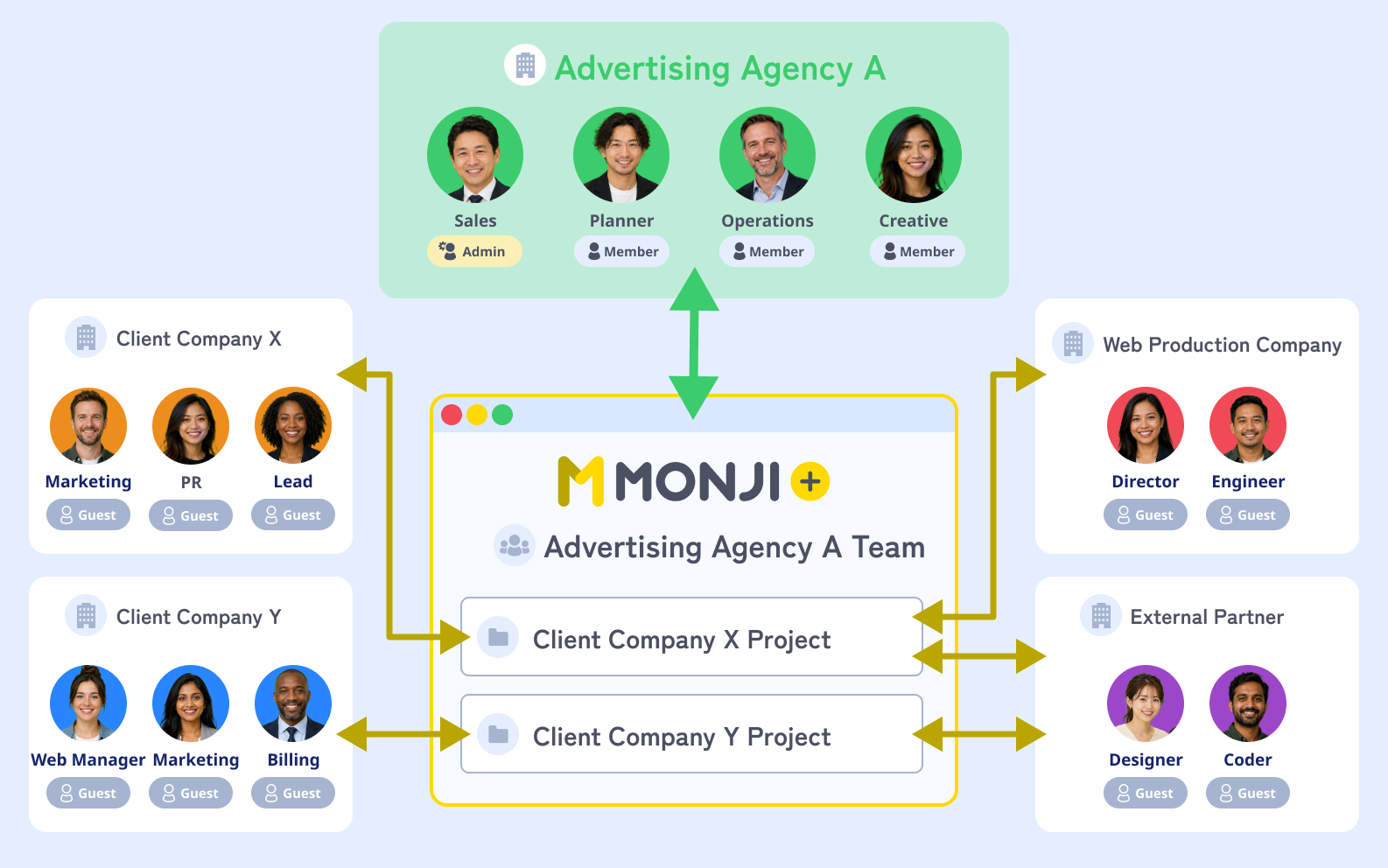
Your agency, the client, and the production partner meet in one project.
Invite guests to share only what each person needs.

Diagram: agency, advertiser, and production partner sharing improvement data in one project
Pattern A
Agency teamEC brandProjectSaaSProjectRestaurantProject

Run one agency team across multiple clients

Create one team for your agency and open a project per client.
A good fit when you want a bird's-eye view of every client and want to spread improvement know-how across the portfolio.

Pattern B
Client A TeamClient B TeamLPProjectBannerProjectEmailProjectSNSProject

Split teams by client, with projects per channel and campaign

Create one team per client and break projects out by campaign or channel.
A good fit when you want dedicated teams for close communication and clearly separated contracts and permissions.

Quick guide

Pick the pattern that fits your client count and operating model.

  • See every client from one placePattern A
  • Separate permissions and contracts by clientPattern B
  • Spread improvement know-how across clientsPattern A
  • Move quickly per channel and campaignPattern B


5 everyday scenes where improvement proposals get stuck

Proposals stall, approvals drag, A/B results never feed the next round.
See how MONJI+ gets each one moving again.

Scene 01

Good improvements never reach your other clients

Before

A fix that worked for one client stays stuck in someone's head or a chat thread, never reaching other accounts.
So strategists and planners end up rethinking improvements from scratch for every client.

With MONJI+

Know-how builds up in the Wiki and gets reused, stacking up to 3× more insights *1

  1. 1Use Google Analytics integration to spot changes in each client's numbers
  2. 2Mark up declining pages with improvement ideas directly
  3. 3Capture know-how in the Wiki and spread it across clients

Good improvements never reach your other clients
Scene 02

Improvement progress is invisible and hard to manage

Before

Fixes sent over email or Slack get scattered across threads, so it's unclear what's done and what's still pending.
So account planners have to keep chasing whether anything ever got built.

With MONJI+

Proposals flow straight through as feedback, with up to 80% fewer missed launches *1

  1. 1Mark up the live page with improvement proposals (Feedback)
  2. 2Invite the production partner as a guest and hand them the feedback
  3. 3Track implementation progress through statuses
FeaturesFeedback
Improvement progress is invisible and hard to manage
Scene 03

You can't run multiple creative variants in parallel

Before

Banner and LP variants live in a spreadsheet, with feedback scattered across people and channels.
As a result, version control piles up on the creative director alone.

With MONJI+

Every creative's status lives on one screen, cutting management effort to 1/3 *1

  1. 1Open a project per creative variant
  2. 2Capture feedback directly on each variant to consolidate decisions
  3. 3See every variant's status on one screen
You can't run multiple creative variants in parallel
Scene 04

A/B test results never feed the next proposal

Before

The A/B numbers are there, but they never become the next idea or request.
So the team moves on to the next campaign without ever using the data.

With MONJI+

The 'propose → result → next proposal' loop turns up to 2× faster *1

  1. 1Mark up the results page with the next improvement directly
  2. 2Capture lessons from past cycles in the Wiki
  3. 3Log it as the next improvement proposal
A/B test results never feed the next proposal
Scene 05

Slow client approvals drain the energy out of every campaign

Before

Build the deck, email it, wait for the approval meeting — the back-and-forth alone eats up time.
As a result, the idea goes stale by the time it clears, and ships as-is anyway.

With MONJI+

Email ping-pong disappears and approvals run in 1/2 the time *1

  1. 1Invite the client as a guest
  2. 2Show GA-linked numbers and the proposal on the same screen
  3. 3Get sign-off through statuses and hand it straight to implementation
Slow client approvals drain the energy out of every campaign

*1 Internal data. Actual results vary by usage, workflow, and project type.

Workflows powered by MONJI+

Chain these scenes together to carry proposals through to implementation.
Propose-to-ship loop, campaign A/B loop, decision-driving — three playbooks.

Work flow 01

Turn the monthly report into shipped improvements

Chain GA review, proposal drafting, client sign-off, and feedback handoff into one continuous flow.

  1. 01

    Every Mon

    Automated

    Catch changes with Issue Detection

    Website Issue Detection & Improvement
  2. 02

    Day 1-3

    Agency

    Build the monthly GA report

    GA integration
  3. 03

    Day 3-5

    Agency → Client

    Create and share the proposal

    Feedback
  4. 04

    Day 5-7

    Client

    Review and comment to approve

    Feedback
  5. 05

    Day 7-20

    Production

    Receive and ship the feedback

    Feedback
Work flow 02

Run campaign LPs in parallel

Manage multiple LPs, banners, hooks, feedback, and approval status by client.

  1. 01

    Week 1

    Agency

    Upload multiple variants

    File sharing
  2. 02

    Week 1

    Client + partners

    Decide together on the screen

    Feedback
  3. 03

    Week 2

    AI + Production

    Check copy with AI before submission

    AI Typo Detection
  4. 04

    Week 2

    Production

    Receive feedback and build the revision

    Feedback
  5. 05

    End of Week 2

    Agency

    Move A/B results into the next round

    GA integration
Work flow 03

Move client approvals forward

Share improvement proposals, A/B results, and edits as one set of information so review and approval move smoothly.

  1. 01

    Setup

    Agency

    Place GA numbers and proposals on the screen

    GA integration
  2. 02

    Proposal day

    Agency

    Invite the client as a guest

    Guest invite
  3. 03

    After proposal

    Client

    Review and approve on screen

    Feedback
  4. 04

    After approval

    Agency → Production

    Receive and execute the feedback

    Feedback
  5. 05

    Ongoing

    Agency

    Keep the decision record in the Wiki

    Wiki
User Voice

Our proposals used to stall in email threads and never reach production.

Now numbers, proposals, and feedback live on one screen, so clients decide faster and handoffs to our production partner go smoothly.

Work that used to end at 'proposal sent' now actually ships.

— Planner at an ad agency managing multiple clients

Common questions before getting started

Here are the questions ad agency teams ask us most.

Q.01

Can we separate information by client?

Yes — split teams and projects per client.
Improvement proposals, feedback, assets, and comment history stay organized per client, so even agencies handling many accounts can keep information clean.

Q.02

Can production partners and internal members join too?

Invite production partners and client contacts as guests alongside internal members.
Agency, brand, and partner go from proposal review to feedback to implementation — all on one screen.

Q.03

Can we track improvement proposal progress?

Yes — log proposals as feedback and track them through statuses like In Progress, In Review, and Done.
They stop getting buried in email and chat, so you can follow each one from client review to production handoff.

Q.04

Can we use A/B test and GA results in improvement proposals?

Yes — comment right on the pages you want to improve, based on GA and A/B test data.
Numbers stop being a dead end and become the next proposal or implementation request.

Q.05

Can we manage multiple clients at the same time?

Yes — open a project per client and run multiple accounts in parallel.
Each client's proposals, feedback, and partner exchanges stay separate, so you can keep track even as accounts grow.

Q.06

Can we control what the client sees?

Yes — guest invitations let you share only what each person needs to see.
You share with clients per project, so there's no need to expose internal agency information or other clients' data.

Start with the one project where improvements are stuck.

Try every feature with a 30-day free trial.

You don't have to roll it out across every client at once.
Pick one project — where improvement proposals stall, where approvals drag, where the bottleneck runs deepest — and try MONJI+ on it.

Project types where MONJI+ shines

  • Projects where improvement proposals stall
  • Projects with slow client approvals
  • Projects running multiple creative variants
  • Projects that need data-driven improvement
  • Projects with heavy coordination across brand and production
  • Projects on a continuous improvement retainer

MONJI+ keeps evolving with how ad agencies actually work

We keep refining MONJI+ to be easier to use and to drive more meaningful outcomes.

FEAT 01

Feedback trend analysisPlanned

AI analyzes your feedback history and surfaces patterns worth improving.

FEAT 02

AI-powered site improvement suggestionsPlanned

AI scans page screenshots and points out spots to improve.

FEAT 03

Sitemap viewPlanned

Manage feedback, info, and data efficiently at the page level.

* Upcoming features are subject to change.

Your feedback is what shapes MONJI+.

Something that felt off, a feature you wish existed, a small idea — all of it counts.
Reach out through any of these four channels.

1

Re:MONJI

Open development driven by your voice

2

MONJI egg program

Shape new features together

3

Contact form

Talk to us one-on-one

4

Academic edition

Built on voices from education