






MONJI+

User Support

Your go-to support page for troubleshooting and getting the most out of MONJI+

MONJI+ for In-house Web Teams

Don't carry WebOps alone — connect inside and outside to drive outcomes.
Bring your internal and external work together so WebOps no longer rests on one person.

Internal and external members review, request, and share — all on the same screen.

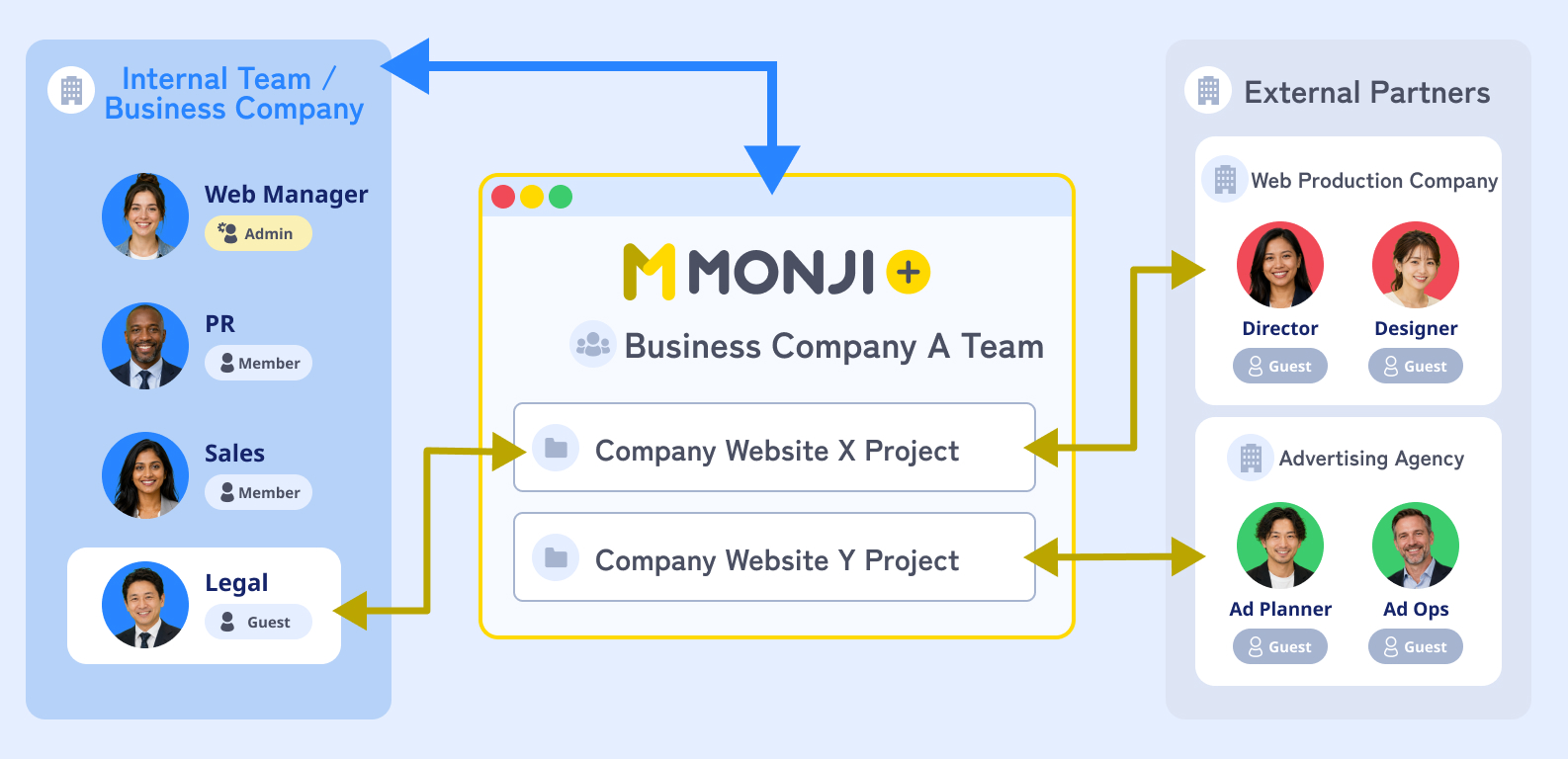
Your in-house team and external partners meet in one project.
Invite guests to share only what each person needs.

Diagram: in-house web team, related departments, and external partners sharing one project
Pattern A
WebOps teamCorporate siteProjectService siteProjectRecruiting siteProject

Manage all of your sites under one WebOps team

Create one WebOps team in-house and manage your corporate site, service site, LPs, and more together.
A good fit when you want to oversee the whole company's WebOps from one place.

Pattern B
PR TeamMarketing TeamCorporate siteProjectRecruiting siteProjectService siteProjectAd LPProject

Split teams by department or project

Create separate teams per project — corporate maintenance, rebranding, ad LPs — and keep external partners and internal members scoped to each one.
A good fit when you need to split permissions and budgets per project.

Quick guide

Pick the pattern that matches how your company operates.

  • Oversee all of your sites in one placePattern A
  • Split permissions and budgets per projectPattern B
  • A small web team covering everythingPattern A
  • Run rebranding or ad LP projects independentlyPattern B


5 everyday scenes where WebOps gets stuck

Asset sharing, feedback, pre-launch QA, Issue Detection, GA improvement.
See how MONJI+ keeps the load off one person.

Scene 01

Assets get scattered across internal requests

Before

Requests from sales, HR, PR, and execs arrive across email, chat, and hallway chats.
As a result, the web manager has to round up assets and materials from all over.

With MONJI+

Materials, URLs, and ops knowledge land in one place — up to 80% less search time *1

  1. 1Upload directly into the project with file sharing
  2. 2Bookmark URLs and reference sites in the same place
  3. 3Share operating guides and context in the Wiki

Assets get scattered across internal requests
Scene 02

Feedback to outside partners gets buried in internal chat

Before

Internal feedback scatters across chat, and messages to partners split across email threads.
So nothing reaches the agency until the web manager has re-sorted every request.

With MONJI+

What was asked and what's been done stays on screen, with up to 5× fewer exchanges *1

  1. 1Write feedback directly on the page in the browser
  2. 2Update the status (In Progress / Done)
  3. 3Show related departments the exact same screen
FeaturesFeedback
Feedback to outside partners gets buried in internal chat
Scene 03

Pre-launch final checks pile up on the web manager

Before

Pre-launch checks, plus exec and legal sign-off, all live in separate docs and channels.
That's why both QA and internal approval end up on the web manager alone.

With MONJI+

AI auto-detects issues so the web manager no longer carries final QA alone

  1. 1Turn on AI Typo Detection for Feedback and scan the page
  2. 2Convert flagged issues into feedback
  3. 3Assign each one to the right team or partner on the same screen
Pre-launch final checks pile up on the web manager
Scene 04

Site issues only surface after someone else complains

Before

Site issues usually surface only after another team or a customer points them out.
Yet manual patrols only go so far, so the response stays a step behind.

With MONJI+

Catch issues early — before other departments or customers do

  1. 1Register the URLs to monitor
  2. 2Set the crawl frequency and notification target
  3. 3Get notified the moment something breaks
Site issues only surface after someone else complains
Scene 05

The numbers don't translate into internal proposals or feedback

Before

GA sits in one tab, internal proposals in another doc, and feedback lands much later.
As a result, the web manager and marketing can't move until they've retyped the numbers.

With MONJI+

GA inline — go from numbers to feedback without switching tools

  1. 1Check Google Analytics inside MONJI+
  2. 2Mark up the pages where issues were detected
  3. 3Send them as feedback straight to your external partner
The numbers don't translate into internal proposals or feedback

*1 Internal data. Actual results vary by usage, workflow, and project type.

Workflows powered by MONJI+

Chain these scenes together to run your own site day to day.
Internal requests, partner collaboration, monthly improvement — three playbooks.

Work flow 01

Collect internal requests and ship them to the site

The in-house WebOps team gathers update requests from PR, HR, and sales into one project and ships them.

  1. 01

    Day 1

    WebOps team

    Create an update project

    Team/project
  2. 02

    Day 1-2

    Each department

    Mark up what to change on screen

    Feedback
  3. 03

    Day 3-5

    WebOps team

    Apply the fixes

    Feedback
  4. 04

    Day 5-7

    AI + Web

    Check copy and typos with AI

    AI typo detection
  5. 05

    Day 8-10

    WebOps team

    Apply changes and mark done

    Feedback list
Work flow 02

Run your site together with agencies and partners

Invite your production agency or ad agency into the project and share feedback, materials, and history on the same screen as your team.

  1. 01

    Setup

    WebOps team

    Set up a project for partners

    Team/project
  2. 02

    Kickoff

    WebOps team

    Invite agencies and partners as guests

    Guest invite
  3. 03

    On request

    Web → Partner

    Share edit and build requests on screen

    Feedback
  4. 04

    In progress

    Partner

    Gather responses and assets in one place

    File sharing
  5. 05

    Ongoing

    WebOps team

    Keep the exchange in the Wiki for handoff

    Wiki
Work flow 03

Run and improve multiple sites every month

Fold anomaly alerts, GA checks, cross-team improvements, and leadership reporting into a monthly cycle.

  1. 01

    Every Mon

    Automatic

    Anomaly alert arrives

    Website anomaly detection
  2. 02

    Day 1

    WebOps team

    Review GA numbers

    GA integration
  3. 03

    Day 1-5

    WebOps team

    Log improvements as feedback

    Feedback
  4. 04

    Day 5-7

    Web → departments

    Share improvements with teams

    Feedback
  5. 05

    Day 10

    Web → leadership

    Report the monthly summary

    File sharing
User Voice

I used to handle most site reviews on my own.

Now departments and external partners review the same screen with me, so we go back and forth far less.

Because feedback and history stay on the project, monthly proposals and handoffs to a new owner are much easier.

— Web manager at a company operating its own site

Common questions before getting started

Here are the questions we hear most often from in-house WebOps teams.

Q.01

Can internal members who aren't web-savvy still use it?

You can write comments directly on the page in the browser, so it works without specialized knowledge.
Even people outside the web team — PR, sales, HR, legal — can be looped in for review.

Q.02

Can we have our agencies and ad agencies use it too?

Invite external partners as guests and share only the projects they need.
Internal members and agencies or ad agencies can work through feedback and reviews on the same screen.

Q.03

Can we start with just a few sites?

You don't have to roll it out everywhere at once.
Start with one site where feedback and internal review pile up — your corporate site, careers site, or an LP.

Q.04

Do we need to change our current workflow much?

MONJI+ doesn't replace your chat, email, or task management tools. Use it as the home for website review, feedback, and sharing, alongside the tools you already have.

Q.05

How much do external members see?

With guest invites, you share only what each person needs.
External members — agencies, ad agencies — get scoped access per project, so you don't have to expose everything internal.

Q.06

Is it useful when handing off to a new owner?

Feedback, comments, statuses, and materials stay on the project, so the next owner can trace the history.
Keep rules and know-how in the Wiki, and WebOps knowledge that lived in one person becomes a team asset.

Start with the one site that's the heaviest on WebOps.

Try every feature free for 30 days.

You don't have to roll it out everywhere at once.
Pick the site with the most internal reviews or external partner exchanges, and try MONJI+ there first.

Sites and workflows where MONJI+ shines

  • Sites with frequent feedback back-and-forth
  • Sites with heavy internal approvals or cross-team review
  • Sites you run with external agencies or ad agencies
  • Sites on long-term operations or maintenance
  • Sites where pre-launch checks really matter
  • Projects with many stakeholders and departments

MONJI+ keeps evolving with how in-house WebOps teams actually work

We keep refining MONJI+ to be easier to use and to drive more meaningful outcomes.

FEAT 01

Feedback trend analysisPlanned

AI analyzes your feedback history and surfaces patterns worth improving.

FEAT 02

AI-powered site improvement suggestionsPlanned

AI scans page screenshots and points out spots to improve.

FEAT 03

Sitemap viewPlanned

Manage feedback, info, and data efficiently at the page level.

* Upcoming features are subject to change.

Your feedback is what shapes MONJI+.

Something that felt off, a feature you wish existed, a small idea — all of it counts.
Reach out through any of these four channels.

1

Re:MONJI

Open development driven by your voice

2

MONJI egg program

Shape new features together

3

Contact form

Talk to us one-on-one

4

Academic edition

Built on voices from education